Calendar
The week and month. Colors tell you what will publish, what still needs you, and what Autopilot is still making.
You are here: Left sidebar: Calendar
Calendar is the picture of the plan. Drag a post to another day if the date is wrong. Writing happens in Studio. Autopilot lives top right, not in the sidebar.
When to use this
Checking you are not silent on Friday. Starting Autopilot. Seeing at a glance what is approved versus still waiting.
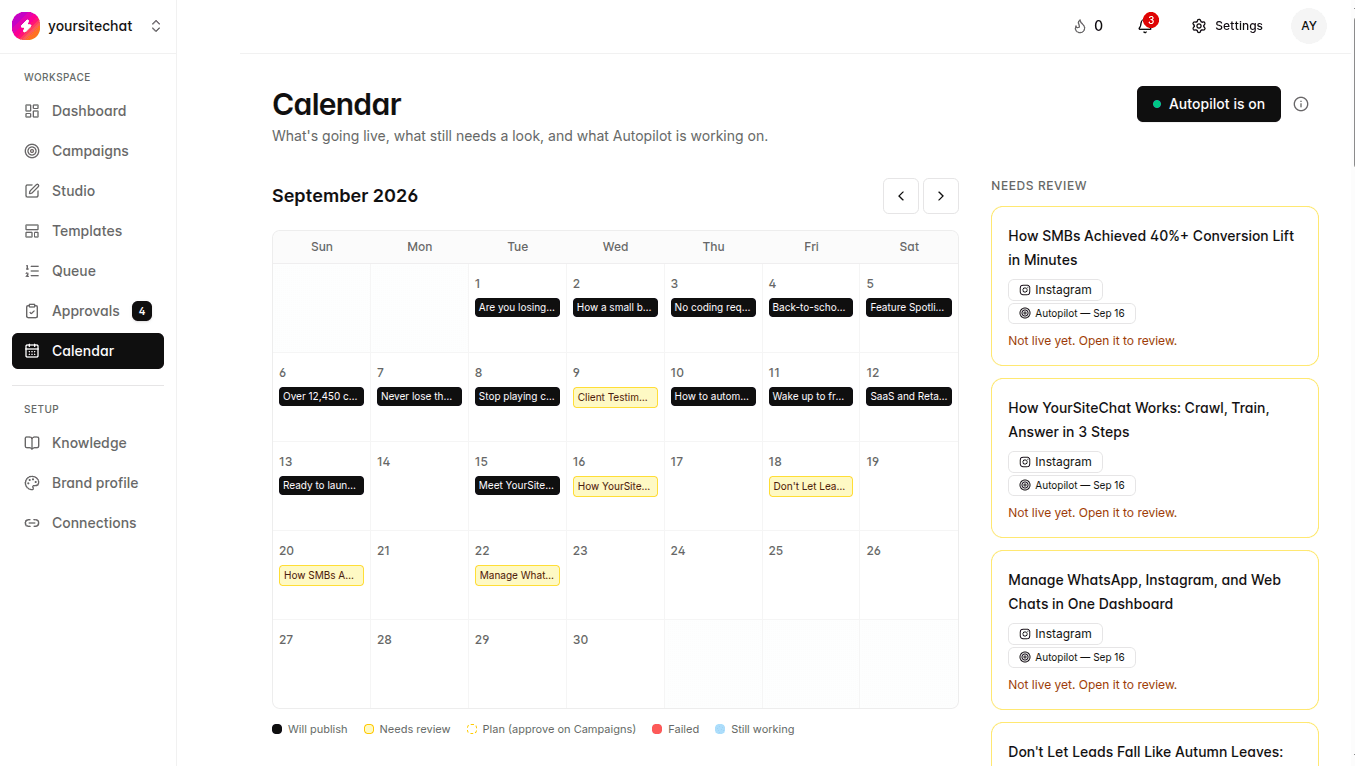
What the colors mean
| On screen | Label | What it means | Example |
|---|---|---|---|
| Will publish | Approved and lined up, or already published. This is the “going out” chip. Auto-approve and a manual Approve & schedule both land here once they are cleared. | House espresso, Tuesday 10:00, black bar. You already said yes, or auto-approve did. | |
| Needs review | A person still has to look. Not live. Same work as the Approvals list and the amber cards in the Calendar sidebar. | Office 1kg plan on Wednesday. Open it, edit in Studio if you want, then approve. | |
| Plan · needs review | Autopilot wrote the week but you asked to see the plan first. There is no finished post yet. Approve that plan on Campaigns and images start. | Dashed amber chip: “Plan · needs review.” Calendar may also say Autopilot paused. | |
| Failed | That post did not generate. Open Campaigns and retry, or make it in Studio. | A chip that says Failed to generate on Thursday. | |
| Still working | Autopilot is making that post right now. The Autopilot button also pulses blue and reads Making posts… | A pulsing blue bar on Monday while the batch runs. | |
| Autopilot is on | This is the button top right, not a day chip. Green light plus Autopilot is on. Hover: “Click to change Autopilot.” | After Start Autopilot. Click again to change settings or Turn off Autopilot. | |
| Autopilot off | Grey light on the Autopilot button. Hover: “Click to turn it on. It keeps posting even while you're away.” | Sparkles icon and the word Autopilot. Posts already scheduled still go out. | |
| Autopilot paused | Still on, but waiting. Either a draft plan on Campaigns, or yellow posts in Approvals. A new batch will not start until that is cleared. | Button reads Autopilot paused. Amber banner tells you which list to open. | |
| Autopilot didn't finish | The batch failed, or billing / the AI image cap stopped it. Open Campaigns to finish posts, or Billing if the banner says so. | Button reads Autopilot didn't finish, or Autopilot paused with a billing note. |
Notes
- Timezone follows the workspace.
- Black and amber are the two you will see most. Black is going live. Amber still needs you.
- A blue “+N more” link on a packed day opens the rest of that day’s posts.
- Empty days after setup usually mean Autopilot is off, you have not started a campaign, and you have not scheduled anything from Studio.
What happens if you skip it
Queue covers the same posts in a list. Calendar is better when dates matter, and it is where Autopilot lives.