Autopilot / Agent Mode
Keep the calendar full without writing every post. Plan, images, schedule, publish, then repeat.
You are here: Calendar, top right: Autopilot / Agent Mode (plus the info tip next to it)
Autopilot / Agent Mode is the always-on loop. You pick a start date, a posting time, how many days to fill, and which connected accounts. Then you start it. It writes a plan, makes images, and schedules posts. When that window ends, if it is still on, it starts the next window. You do not have to come back every day.
When to use this
After Brand profile, a little Knowledge, and at least one connected account. Use it when you want a month of posts without opening Studio for each one. One-off launches still belong in Campaigns.
The Calendar button
Autopilot / Agent Mode lives on Calendar, not in the left sidebar. Hover the Autopilot button. You should see: “Click to turn it on. It keeps posting even while you're away.” Click it and the same dialog as the app opens: Turn on Autopilot, then the sleep line underneath. After Start Autopilot the button reads Autopilot is on, with a green light. Hover then says “Click to change Autopilot.” Click it again for Configure Autopilot, then Turn off Autopilot, and the light goes grey.
Calendar
Same Autopilot control as the app. Hover, then click.
Mon
Tue
Wed
Thu
Fri
Posts already scheduled will still go out. Hover Autopilot, then click when you want a new batch.
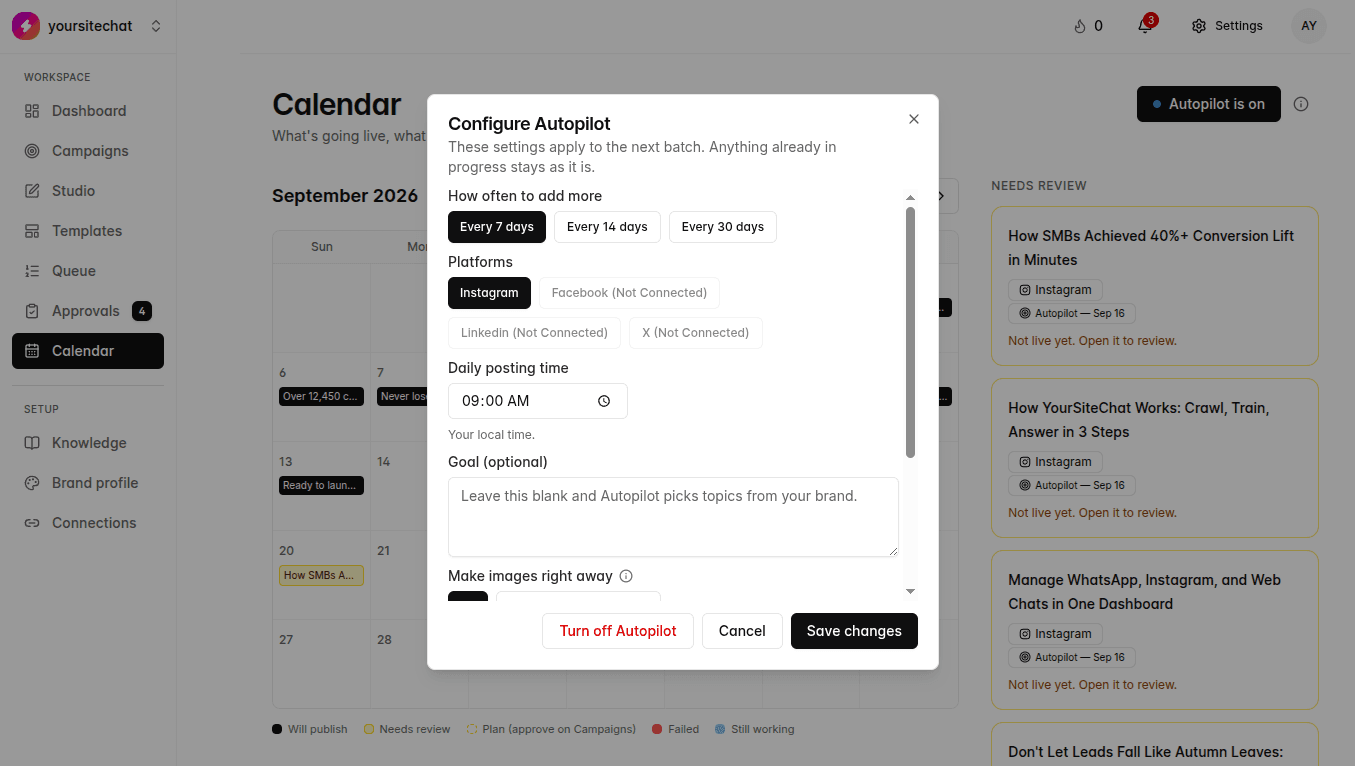
Fields
Examples use Northstar Coffee, a fictional roaster. Copy the shape, not the facts.
| Field | What to add | Example | Why it matters |
|---|---|---|---|
| Start date | The first day of this batch. Today is fine. | 21 Sep 2026 | Posts are planned from this day. A date already covered by a running batch just turns Autopilot back on. It does not stack a second batch on top. |
| How often to add more | Length of each window. 7, 14, or 30 days. | Every 30 days | When the window ends, if Autopilot is still on, the next batch starts. Thirty days means a new plan about once a month. |
| Platforms | Accounts that are already connected. You cannot pick a network that is not linked. | Instagram and Facebook | Nothing publishes without a connected account. LinkedIn is the third live network. |
| Daily posting time | Your local time. Autopilot aims slots around this hour. | 10:00 | Keeps the week from posting at 3am in your timezone. |
| Goal | Optional. Leave blank and Autopilot uses Brand profile and Knowledge. | Get offices to start a biweekly 1kg Northstar subscription this month. | A real goal beats a week of vague “stay active” posts. Eight characters minimum if you type one. |
| Make images right away | On: accept the plan and start images. Off: you review the plan on Campaigns first. | On, once you trust a week of drafts | This is the same control as Calendar Autopilot review in Settings. It is not the same as auto-approve for going live. |
| Allow carousels | On: Autopilot may pick a multi-image post. Off: every post is a single image. | On | Each carousel slide uses one AI image from your monthly cap. Slide count still follows Settings → Content. |
Steps
- 1
Open Calendar and click Autopilot
Top right. Hover first: “Click to turn it on. It keeps posting even while you're away.” The info icon is the longer tip. Click the button. The dialog title is Turn on Autopilot.
- 2
Set the window
Start date, every 7 / 14 / 30 days, daily time, connected platforms. Northstar might pick 30 days, 10:00, Instagram and Facebook.
- 3
Choose how much happens without you
Make images right away, or review the plan on Campaigns first. Publish auto-approve is a separate switch under Settings → Approval rules. Both can be on if you trust the drafts and have a connected account.
- 4
Start Autopilot
It writes a campaign plan, then makes images (unless you asked to review the plan first). Posts show on Calendar, Queue, and Approvals. Connected channels get what you approved, or what cleared auto-approve.
- 5
The loop repeats
If you chose 30 days and Autopilot is still on, when that window ends it starts the next 30-day plan on its own. Same for 7 or 14. You do not click Start again unless you turned it off.
- 6
Pause or turn it off
Turn off Autopilot from the same button, then Turn off Autopilot. Posts already scheduled still go out. When that leftover queue is empty, it stops. It will not start a new 7 / 14 / 30-day batch until you turn it on again. If it is waiting on a plan or on Approvals, a new batch also waits.
Notes
- It is on Starter, Pro, and Agency. AI images still count against your monthly cap. Scheduled posts do not.
- If a plan is waiting on Campaigns, Autopilot is paused. Approve the plan and images start. A new window does not start until then.
- If posts are waiting in Approvals, Autopilot is paused the same way. Clear the list, then it can continue.
- If you hit the AI image cap or billing is inactive, Autopilot pauses. Open Billing. Posts already scheduled can still publish.
- Change cadence, time, or platforms while it is on. Those changes apply to the next batch, not to posts already in progress.
What happens if you skip it
If you skip Autopilot / Agent Mode you can still run one-off campaigns and Studio posts. The calendar will not refill itself.