
Festival mode has its own calendar, separate from Campaigns and Autopilot. For each day you leave on, it makes one image and one caption, then posts that on every connected channel.
When to use it
Use it for holidays. Leave it off if Autopilot or Studio is enough.
On screen
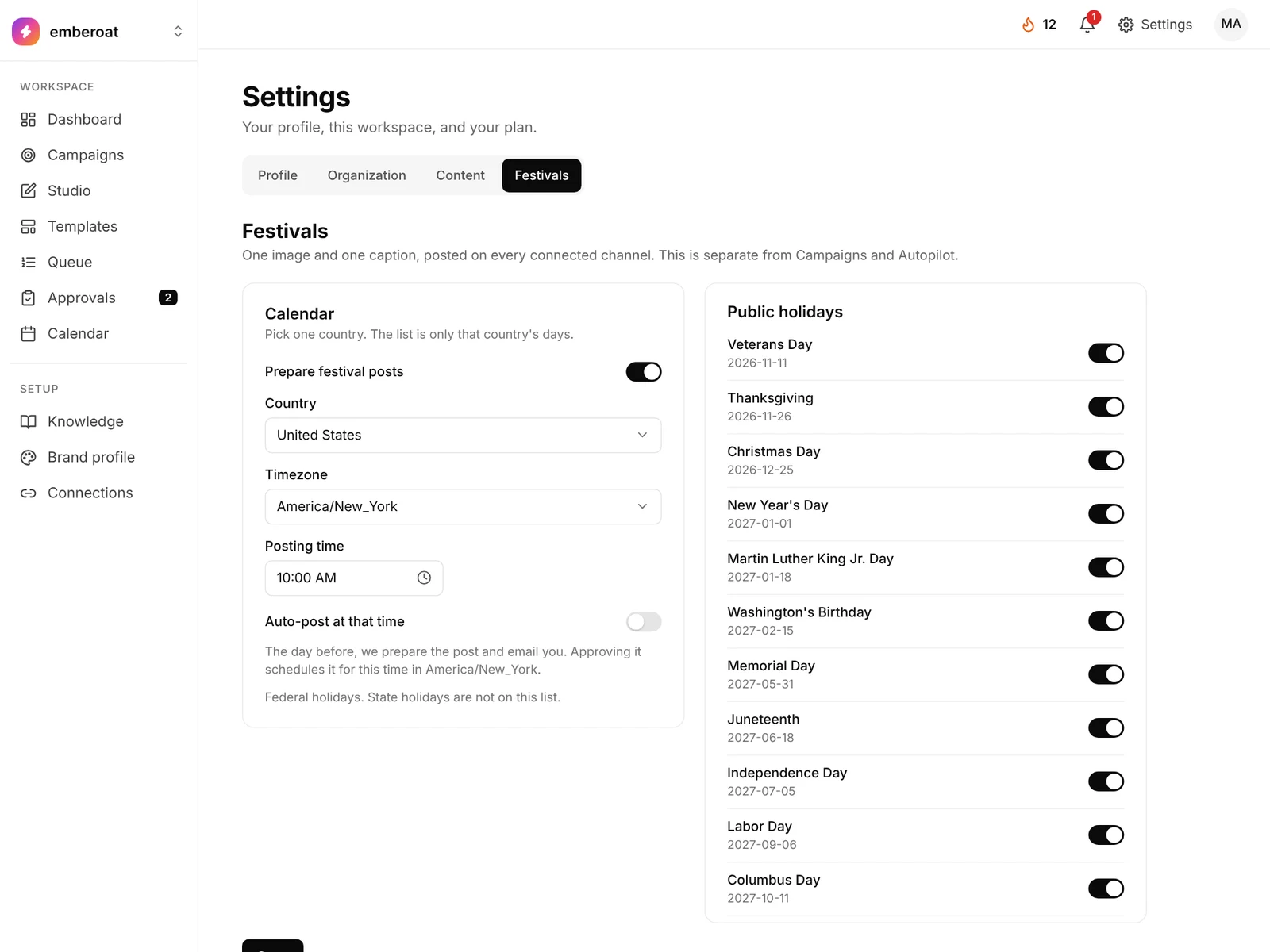
What to fill
Examples use Northstar Coffee, a fictional roaster. Copy the shape, not the facts.
| Field | What to add | Example | Why it matters |
|---|---|---|---|
| Prepare festival posts | Turns festival posts on for this workspace. Off, and nothing is prepared. | On | You can read the list without making posts. |
| Country | India, the United States, or the United Kingdom. You pick one. The list shows only that country. | United States | The United States list is federal holidays. The UK list is bank holidays for England and Wales. India includes public holidays and festival days such as Diwali, Holi, and Sharad Navratri. |
| Timezone | The timezone for the posting time and for the morning the draft is made. | America/New_York | 9:00 and the posting time follow this timezone. |
| Posting time | The time on the holiday when the post should go out. | 10:00 | The draft is made the day before. It goes out at this time after you approve it, or automatically if auto-post is on. |
| Auto-post at that time | Off waits for you to approve. On schedules the post without a review. | Off | Off emails you a review link. On schedules the post and emails you that it is scheduled. |
| Each day | A switch for that holiday. Public holidays start on. Some extra days start off. Sharad Navratri is nine days. You can turn all nine on, or turn days off one by one. | Thanksgiving on, a Chhath day left off | A day that is off is skipped. Each day that is on uses one AI image from your monthly allowance. The same image is used on every channel. |
Steps
- Open Festivals in Settings. Turn on Prepare festival posts. Choose the country, timezone, and posting time. Turn the days you want on or off, then save. The owner or an admin can save. Members and viewers can view the list.
- Connect an account. Connect Instagram, a Facebook Page, or LinkedIn. If none is connected, you get an email and no image is made. After you connect one, it tries again.
- The draft is made the day before. At 9:00 in your timezone, the day before the holiday, it writes one caption and makes one image from your brand profile and knowledge. That image and caption go on every connected channel. It keeps trying until 9:00 on the holiday morning.
- Approve it, or let it post. If auto-post is off, the email asks you to review. Approving it schedules the time you saved. If auto-post is on, it schedules that time and the email says so. You can open the post in Studio either way.
Notes
- If the post is still not ready at 9:00 on the holiday morning, that day is skipped and you get an email. It is not posted the next day.
- If your posting time has already passed and it is still the holiday, the post is set for about 15 minutes later.
- If billing is blocked, or you have no AI images left this month, you get an email. It keeps trying until 9:00 on the holiday morning.
- These posts stay separate from Campaigns and Autopilot.