
The AI social media automation platform that runs itself.
Autopilot is the part of TheViralMarketing that keeps your calendar full. Pick a start date, the platforms and a daily posting time once. It plans, designs and schedules every post, and you approve each one or turn on auto-approve.
- Window
- 7, 14 or 30 days, then the next one starts
- Timing
- Your daily posting time, in your time zone
- Channels
- Only the accounts you have connected
- Control
- Review every post, or auto-approve above a score
What is an AI social media automation platform?
An AI social media automation platform is software that does the repeated work of social media for you: it plans topics, writes captions, makes images, schedules posts and publishes them, while a person sets the rules and approves what goes live. TheViralMarketing is one, built for Instagram, Facebook Pages and LinkedIn.
Older tools automated only the last step. You made a post, and a scheduler published it later. An automation platform starts earlier. It reads what you have told it about your business, decides what to post over the next week or month, and makes each post. In TheViralMarketing, that engine is Autopilot.
Automation does not mean losing control. Every post Autopilot makes waits in Approvals unless you turn on auto-approve, and even then only drafts at or above the confidence score you choose go out on their own.
Autopilot vs a scheduler.
| A scheduler | Autopilot in TheViralMarketing | |
|---|---|---|
| Topics | You decide every post | Planned for 7, 14 or 30 days from your brand and knowledge |
| Captions | You write them | Written for each network, in your voice |
| Images | You bring them | Designed with your template, color and logo, or your own uploads |
| Scheduling | You pick each time | Your daily posting time, filled automatically |
| Next month | You start again | The next window starts by itself |
| Approval | Varies by tool and plan | On every plan, with an optional auto-approve threshold |
Want a full comparison? Read TheViralMarketing vs Buffer, vs Hootsuite or vs Later.
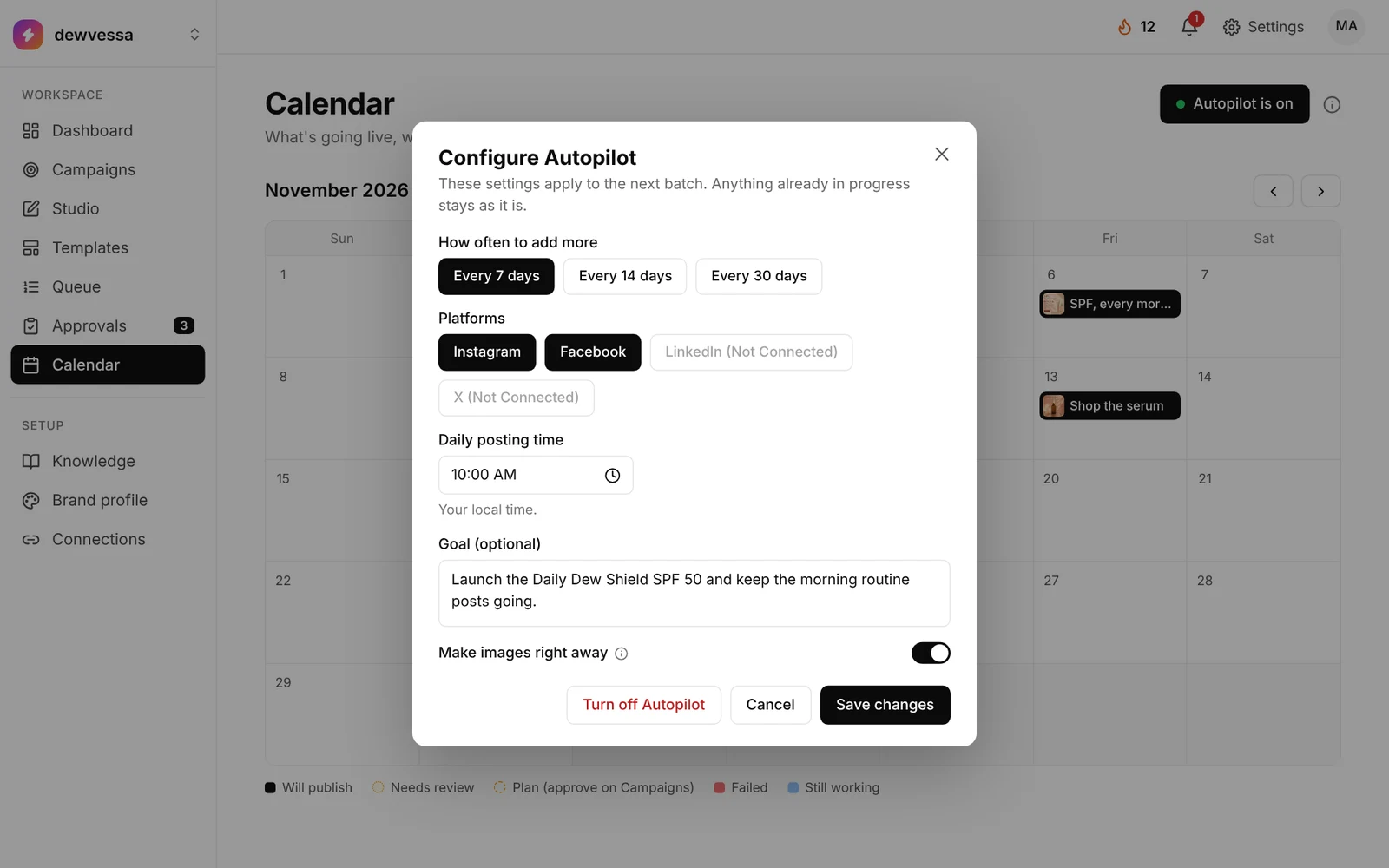
Seven settings. Set once.
Open Calendar and click Autopilot at the top right.
- Start date. Today is fine.
- How often to add more. Every 7, 14 or 30 days.
- Platforms. Only accounts you’ve already connected.
- Daily posting time. Your local time, so nothing goes out at 3am.
- Goal. Optional. Blank means it plans from your brand and knowledge.
- Make images right away. Or keep the plan on Campaigns so you can read it first.
- Allow carousels. Let it pick multi-image posts when they fit.
Seven steps, one loop.
- 01Pick topic
From your main topics and what’s trending.
- 02Write
Captions for each network, in your voice.
- 03Design
Brand kit and templates on every image.
- 04Review
Optional human check in Approvals.
- 05Auto-approve
Only above the score you set.
- 06Post
Publishes to your connected accounts.
- 07Learn
Posts that do well shape the next batch.
You set the rules. It does the rounds.
You control
- Brand profile, voice and products
- Your main topics and an optional goal
- Which accounts it may post to
- The daily posting time and cadence
- Whether plans and posts need your OK
- The auto-approve confidence threshold
It handles
- Planning topics for the whole period
- Captions and hashtags per network
- Images and carousels in your brand kit
- Scheduling into your posting time
- Publishing what you’ve cleared
- Starting the next batch on time
It waits when it should.
Autopilot stays on but waits in these cases. A note on the Calendar tells you what to check.
A plan sits on Campaigns.
You asked to review plans first. Approve it and images start.
Approvals isn’t empty.
Clear the review list and the next batch can begin.
This month’s AI images are used up.
Or billing is paused. Scheduled posts still go out.
You turned it off.
Already-scheduled posts still go out. Then it stops.
Black goes live. Amber needs you.
Each color shows where a post stands.
Approved and lined up, or already published.
A person still has to look. Same list as Approvals.
The days are planned, and the plan waits on Campaigns for your OK.
That post couldn’t be made. Try again, or make it in Studio.
Autopilot is making this post right now.
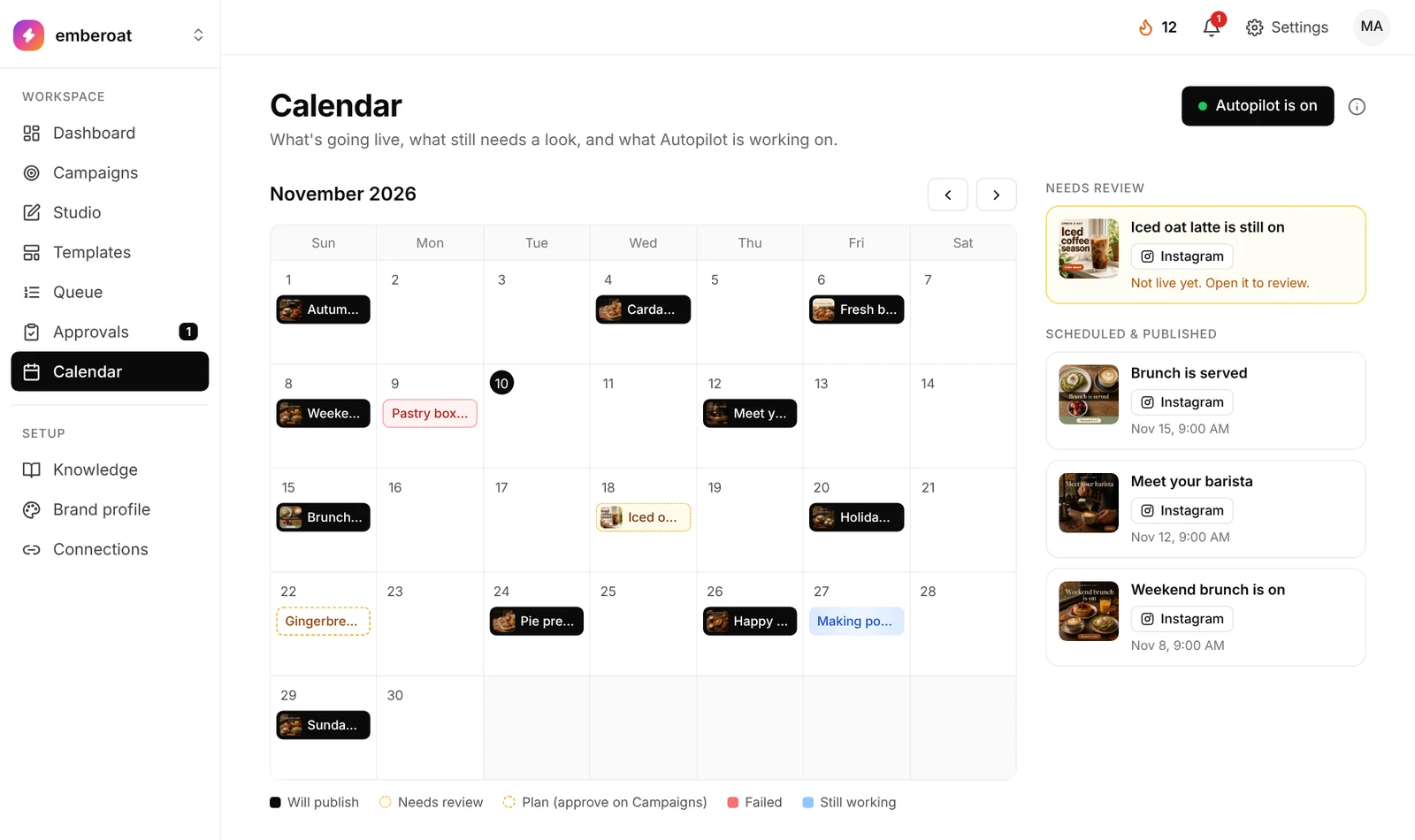
A seasonal push, four posts.
A sample boutique launching its new season while daily posts keep going out.




Festival social media posts, ready the day before.
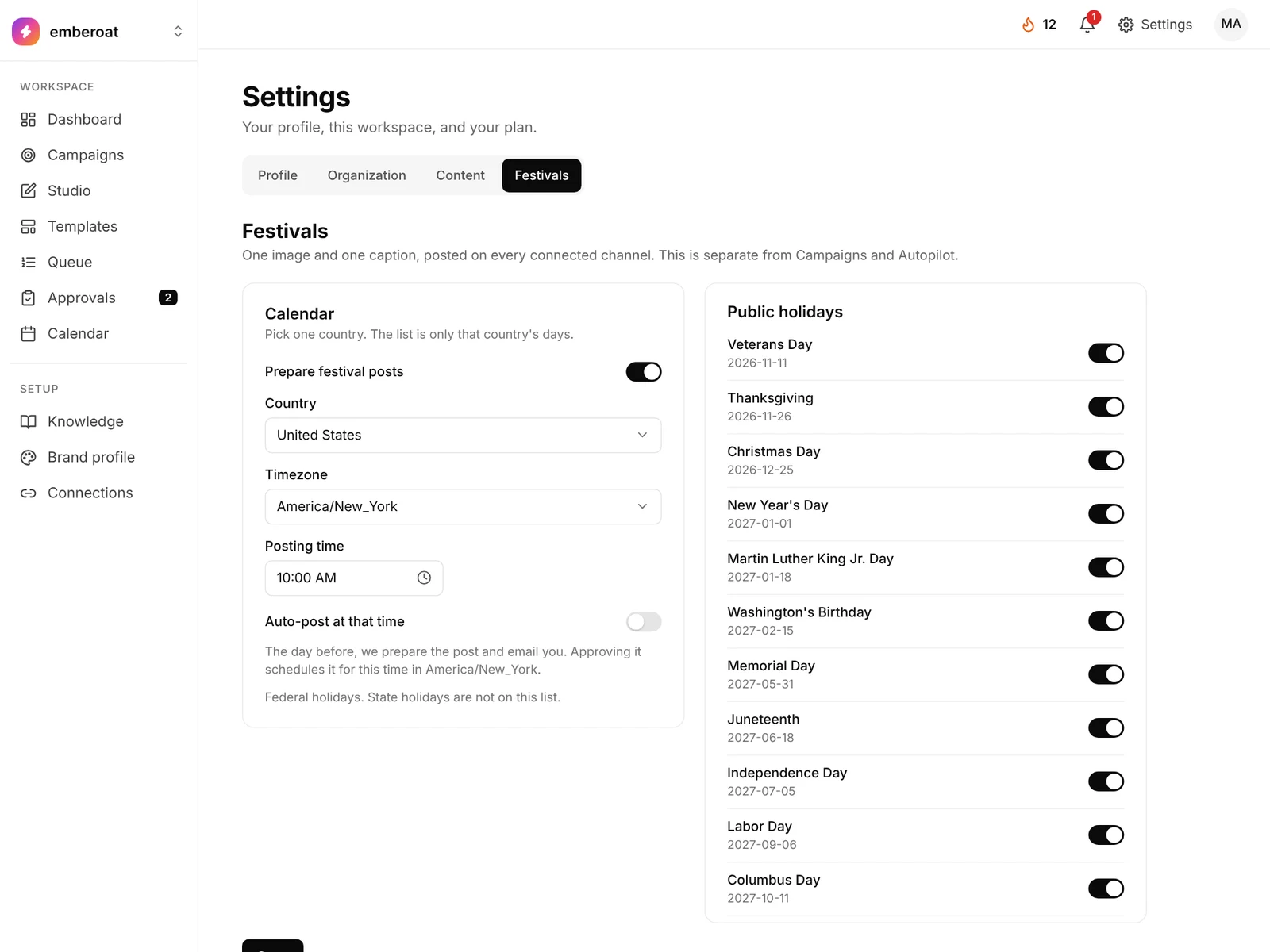
One image and one caption per festival, posted on every connected channel. Festival mode runs on its own, separate from Campaigns and Autopilot.
- Oct

Halloween - Nov

Thanksgiving - Nov

Black Friday - Dec

Christmas - Jan

New Year - Feb

Valentine’s Day - Spring

Easter - May

Mother’s Day - May
Memorial Day - Jul

Independence Day - Sep

Labor Day
Sample festival posts for a café.
- Pick one country: the United States, the United Kingdom or India. You see only that country’s days.
- In the US: Thanksgiving, Black Friday, Halloween, Christmas, New Year, Independence Day and more.
- Choose a timezone and a posting time, for example 10:00 AM in New York.
- The day before, it prepares the post and emails you. Approve it and it’s scheduled for that time.
- Approve each one, or turn on auto-post to publish at that time without a review.
- Switch each day on or off, one by one.
Your Thanksgiving post is drafted a day early, in your brand’s look, instead of the morning of.
Autopilot, Campaigns or Studio?
Three ways to make posts in TheViralMarketing. Most teams use all three.
For a steady rhythm.
Keeps posting every day at your time, 7, 14 or 30 days at a time, and starts the next window by itself.
For one goal.
A launch, a sale or an event. Describe it, choose 7 to 120 days and get a dated plan. Campaigns
For one post, now.
Generate a post from a brief or upload your own photo, then edit and schedule it. Studio
Who uses it: agencies running many client brands, online stores, SaaS teams and founders, and creators. Not sure what to automate? Read what to automate and what to keep human.
Questions, answered straight.
Can Autopilot post without my approval?
Only if you turn on auto-approve under Settings → Approval rules. Otherwise every post waits in Approvals until you approve, edit or reject it.
What if I leave the goal blank?
Autopilot plans from your Brand profile and Knowledge. A real goal, like a launch or an offer, usually beats a week of vague “stay active” posts.
Does it need a connected account?
It can plan and make images without one, but nothing publishes until Instagram, a Facebook Page or LinkedIn is linked in Connections.
What happens when I turn it off?
Posts already scheduled still go out. Once that queue is empty it stops, and no new batch starts until you switch it back on.
Which plans include it?
Starter, Pro and Agency. AI images count against your monthly allowance (100, 300 or 1,000); scheduled posts don’t.
What is an AI social media automation platform?
Software that plans, writes, designs, schedules and publishes social media posts for you, while a person sets the rules and approves what goes live. TheViralMarketing is one, for Instagram, Facebook Pages and LinkedIn.
Can I use my own photos with Autopilot?
Yes. Upload photos in Studio and schedule them alongside Autopilot's posts. Posts from your own uploads don't use AI images.
New to it? Read how AI social media automation works from sign-up to the first scheduled post, the full guide to AI social media managers, or compare AI social media manager pricing.
Let it run overnight.
Set the window once. Check Approvals over coffee.
14 days free · no credit card