
Planning
Black Friday and Cyber Week 2026 social calendar for small businesses
A dated posting plan for Black Friday, Small Business Saturday, Cyber Monday and Giving Tuesday 2026, with US and UK notes and a checklist you can use this week.

Short answer: Cyber Week 2026 runs from Friday 27 November to Monday 30 November. Black Friday is 27 November, Small Business Saturday is 28 November, Cyber Monday is 30 November, and Giving Tuesday is 1 December. Thanksgiving in the United States is Thursday 26 November. Write a post for each day now, schedule it, and check it before it goes live.
Cyber Week 2026 is short, and the dates are fixed. Black Friday is Friday 27 November. Small Business Saturday is 28 November. Cyber Monday is 30 November. Giving Tuesday is 1 December. In the United States, Thanksgiving falls on Thursday 26 November, the day before Black Friday. If you sell in the US or the UK, you can write a post for each of those days now, set the date and time, and read every draft before it goes out.
The 2026 dates
Use this table as the spine of the week. The days do not move, even if your offer does.
Date | Day | Occasion
26 November 2026 | Thursday | Thanksgiving (United States)
27 November 2026 | Friday | Black Friday
28 November 2026 | Saturday | Small Business Saturday (US and UK)
29 November 2026 | Sunday | The in-between day
30 November 2026 | Monday | Cyber Monday. In Scotland this is also St Andrew's Day, a bank holiday.
1 December 2026 | Tuesday | Giving Tuesday
Thanksgiving is a US day. If you only serve customers in the UK, you do not need a turkey greeting. You may still want a post on Thursday 26 November, such as shop hours or a reminder that Friday's offer starts in the morning.
Monday 30 November is Cyber Monday everywhere in this calendar. In Scotland it is also St Andrew's Day, a bank holiday. If your Scottish shop is closed or running Sunday hours, say so in that day's post.
This article is a dated plan for one busy week. For the wider question of which holidays to bother with, and how to keep the tone right, see Holiday and festival social media posts.
What to do in the weeks before
If Black Friday is still ahead of you
You do not have to wait until Friday 27 November to talk about the week. A few early posts help people plan a visit or an order. Keep them specific. Name the date of the offer. Name what is included.
A short teaser: what is on offer, and that it starts on Friday 27 November.
A photo of the actual product, menu item or shop, not a generic sale graphic.
Hours for the weekend, and whether you are open on Thursday 26 November (US shops often change hours that day).
How to order or book, if that takes more than a click.
If you are reading this with only a few days to go, skip the long teaser sequence. Write the Friday, Saturday and Monday posts first, schedule them, then fill the gaps.
The last days before the sale
From about 21 to 25 November, switch from "coming soon" to useful detail. People decide in this window. Tell them when the offer ends, what is excluded, and how long dispatch or collection takes. If a founder is using the week to launch a product, this is the time to say who it is for and when it goes live, not only that a launch is "soon".
A day-by-day Cyber Week plan
Here is a compact calendar you can follow or screenshot. Write in your own words. Change a line if it does not fit how you sell.
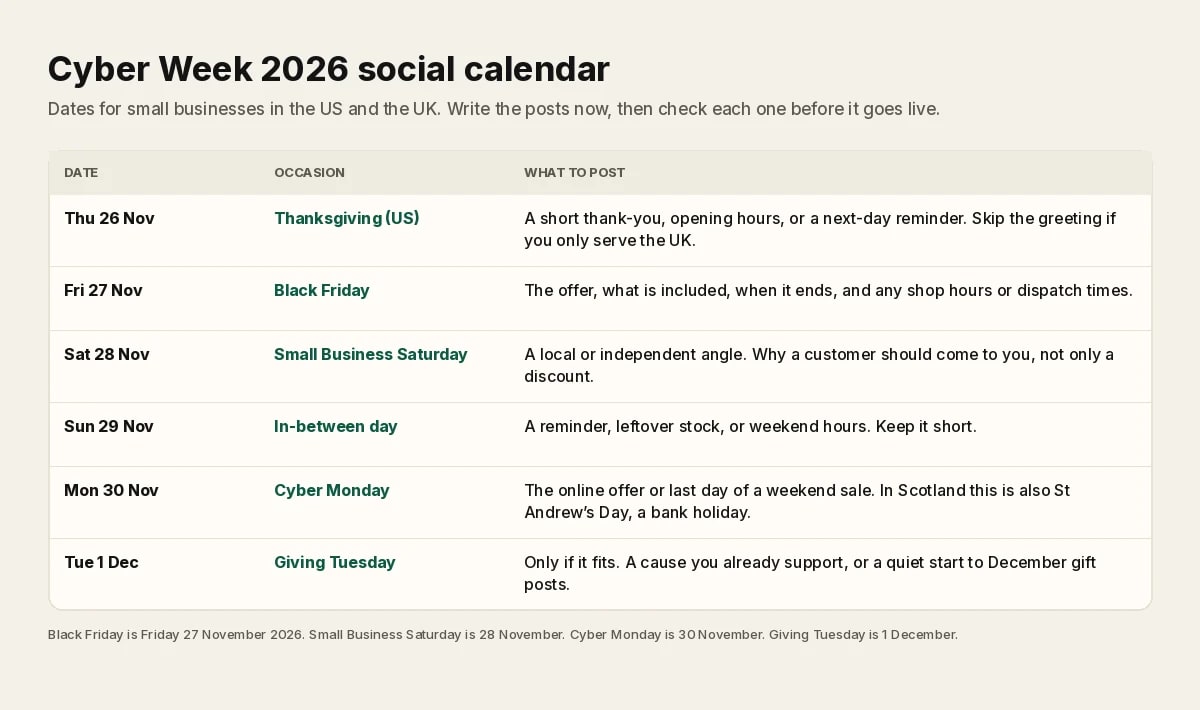
Thursday 26 November, Thanksgiving in the US
US businesses can post a short thank you, holiday hours, or a calm reminder that Friday's offer starts in the morning. Keep it brief. A UK bakery with no US customers can skip the greeting and post hours or a Friday preview instead, or sit the day out.
Friday 27 November, Black Friday
Put the offer in the first line. Say what is included, what is not, and when it ends. Add hours, dispatch times or booking steps. A bakery might post the festive box, the price, and Saturday collection times. A founder running a campaign might post the launch offer and a single clear link or next step. Do not hide the end date in the last line of a long caption.
Saturday 28 November, Small Business Saturday
This one is observed in both the US and the UK on 28 November 2026. It works well when you sound like a local shop, a small studio or an independent maker, even if you also sell online. Talk about the people, the craft or the neighbourhood. A discount can sit in the caption. It should not be the only point.
Sunday 29 November
A short reminder is enough. Leftover stock, weekend hours, or a last day to visit the shop before the Monday online offer. If you are closed on Sundays, you can still post, or you can stay quiet and save the energy for Monday.
Monday 30 November, Cyber Monday
This is the online-heavy day for many shops. State the web offer, the end time, and any delivery notes you already know. If you do not have a separate online deal, say that Friday's offer still runs until a time you name. Scottish businesses should add bank holiday hours where they apply.
Tuesday 1 December, Giving Tuesday
Only post this if it is real for you. A cause you already support, a local collection, or a simple note that you are donating a portion of a product you name. If that is not true for your business, start December instead. A gift guide or a seasonal menu is a better Tuesday post than a sudden charity claim.
How this looks in practice
A bakery
On Friday, post the pastry box, the price and collection times. On Saturday, post a photo from the counter and a welcome for neighbours who want to shop local. On Monday, post any remaining boxes and the last order time for delivery, if you offer it. The photos already live on your phone. The work is the hours, the prices and a caption you are willing to stand by.
A founder running a launch campaign
Treat Cyber Week as a short campaign, not a random sale post. Thursday or Friday can be the launch or the offer. Saturday can explain who the product is for. Monday can be the last day at the launch price, with the time you will switch it off. If you already have a campaign plan in writing, match the posts to that plan, and keep the facts identical on Instagram, Facebook and LinkedIn.
A coding-education creator who posts carousels
You may not be running a shop sale, and that is fine. Saturday 28 November can be a carousel about learning from a small, independent teacher. Friday or Monday can be a real offer on a course or a cohort, if you have one. If you do not, post a useful lesson and skip the fake discount. Daily carousels still need a caption and a scheduled time, even when the week is noisy.
A checklist before anything goes live
The price, dates and exclusions in the caption match the website or the sign in the shop.
Opening hours for 26 to 30 November are correct, including Thursday in the US and Monday in Scotland.
You have a photo or video you are allowed to use. A real product photo beats a generic sale graphic.
The end time of the offer is in the post, and you know who will turn the offer off.
Someone has read the draft. Holiday posts are easy to get wrong when you are busy.
If you sell in both the US and the UK, the caption works for both, or you have scheduled separate posts.
If you want a way to plan the rest of the month, not only this week, we also have a simple guide on how to plan a month of social media posts.
Let the week post itself, so you can run the shop
The value of doing this in mid-November is that Friday does not start with a blank caption box. If you would rather spend Black Friday at the counter than in a caption window, you can hand the day's posts over.
In Festival mode, you pick the holidays once, including Black Friday, Small Business Saturday and Cyber Monday, for the country you sell in. Autopilot then makes those posts in your brand's look and voice, and puts them on the calendar for Instagram, Facebook and LinkedIn. You get the week covered, and you get to work the sale instead of writing it in real time.
You can still open a draft and check it before it goes out. A person approves each post, unless you turn auto-approve on.
Start a 14-day free trial, with no card, at app.theviralmarketing.co.
When Cyber Week is in the calendar, give December the same treatment. We published a separate plan for Christmas and New Year 2027 social posts, which you can also schedule now.
Questions, answered straight.
When is Black Friday 2026?
Friday 27 November 2026. In the United States it falls the day after Thanksgiving, which is Thursday 26 November 2026. Cyber Monday is Monday 30 November 2026.
Is Small Business Saturday the same date in the UK and the US?
Yes. In 2026, Small Business Saturday is Saturday 28 November in both the United States and the United Kingdom, the day after Black Friday.
Should a UK business post about Thanksgiving?
Only if you have US customers who celebrate it. Thanksgiving is Thursday 26 November 2026 in the United States. A UK shop can use that day for hours or a Friday preview, or skip it, and spend the effort on Black Friday and Small Business Saturday.
When is Giving Tuesday 2026, and do I have to post?
Giving Tuesday is Tuesday 1 December 2026. Post only if you already support a cause and can say so honestly. If you do not, a December gift or hours post is a better use of the day.
When should I schedule Cyber Week posts?
Write and schedule them as soon as the offer, hours and photos are certain, ideally in mid-November. Then read each draft again the day before it goes out, because prices and hours can still change.
Can Festival mode and Autopilot handle my Cyber Week posts?
Yes. You pick the holidays once, including Black Friday, Small Business Saturday and Cyber Monday. Autopilot then makes the posts in your brand's style and schedules them to Instagram, Facebook and LinkedIn. You can still check a draft before it goes out. A person approves each post, unless you turn auto-approve on. There is a 14-day free trial, with no card, at app.theviralmarketing.co.
Try it on your own feed.
Fourteen days free, no card. Connect one account and approve your first post.
14 days free · no credit card