
Workflow
The ChatGPT and Canva posting workflow, and how to replace it
The usual stack is a chat tool, Canva and a scheduler. Here is how that workflow runs, where it slows you down, and how Autopilot can take over the daily posts once your brand profile is set.
Short answer: Many people draft captions in ChatGPT or Claude, design images or carousels in Canva, then schedule Instagram, Facebook and LinkedIn by hand. It works, and it is slow, because the work lives in three tools. Set up your brand profile once, and Autopilot can make the daily posts in your look and voice, and schedule them, even while you are busy or asleep.
A lot of small teams already have a posting habit that works, up to a point. They draft a caption in ChatGPT or Claude. They design the image or carousel in Canva. Then they log into Instagram, Facebook and LinkedIn, or into Meta Business Suite, and schedule each post by hand. Nothing is wrong with that stack. The cost is the jumping: three tools, three captions to paste, and a chance to miss a network on a busy day.
What the usual workflow looks like
Here is the pattern, start to finish, for someone who posts often.
Write a brief in a chat tool: the topic, the offer, the audience and any words to avoid.
Ask ChatGPT or Claude for a caption, and often for carousel slide copy as well.
Move that text into Canva. Pick a size, apply your colours, and export a square, a portrait crop or a set of slides.
Open each social network, or a scheduler, and upload the files.
Paste the caption. Adjust the length for LinkedIn or a shorter Instagram line. Add the first comment by hand if you do that.
Pick a date and time, and hope you repeated the same steps for Facebook and LinkedIn.
A coding-education creator doing a daily carousel feels this sharply. The lesson has to be right. The slides have to be readable on a phone. Then the same pack has to reach Instagram and LinkedIn, sometimes Facebook too. A bakery has a different version of the same problem: the photo is already on the phone, but the caption still starts in a chat window and the scheduling still happens somewhere else.
Schedulers help with the last step. They do not write the post or design the image. If you want a side-by-side of a scheduler and a tool that also plans and writes, we drew that out in TheViralMarketing vs Buffer.
Where the time actually goes
The slow parts are rarely the first draft. They are the hand-offs. You copy text out of a chat. You fix a line that is too long for a slide. You export the wrong size and go back to Canva. You schedule Instagram and forget LinkedIn until the evening. None of that needs a dramatic story. It is just several tools that do not share a calendar.
There is also a quality problem, even when you are careful. Chat tools do not see your latest prices unless you paste them. Canva does not know which caption was approved. The scheduler does not know if the slide text still matches the offer. You become the glue.
Let Autopilot do the daily posts
You still need a brand people recognise, and you still need posts to go out. What you can drop is the daily copy-paste between ChatGPT, Canva and three apps.
Set up your brand profile once: what you sell, how you sound, and how posts should look. Then turn on Autopilot. It makes the posts in that look and voice, and schedules them daily to Instagram, Facebook and LinkedIn, including on days when you are busy, or asleep. You open a calendar that is already filling, instead of a blank chat box and a blank Canva file.
You can still read a draft before it goes live. A person approves each post, unless you turn auto-approve on.
If you still want to design a post in Canva yourself, you can upload the finished file and schedule it. For the everyday run, Autopilot is the thing that replaces the three-tool loop.
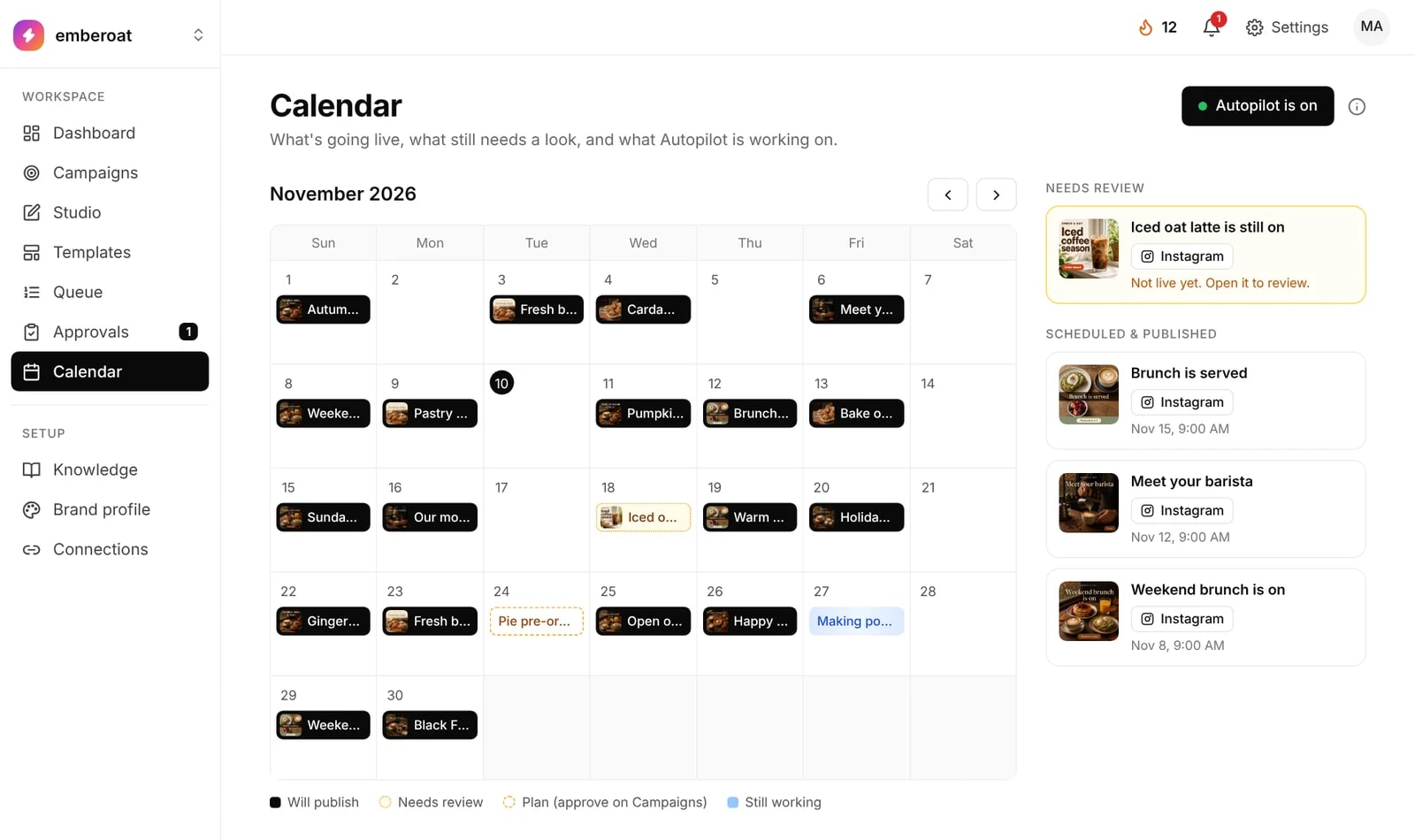
The screenshot above is a sample cafe workspace, with Autopilot on and a month of posts already on the calendar.
If you want a short way to write down how you sound, before you switch Autopilot on, our one-page brand voice guide helps with that.
How this would work for three familiar jobs
The coding-education creator
Add your topics and voice to the brand profile once. Autopilot then keeps a daily post coming, in that style, on Instagram and LinkedIn. You can still check a lesson if it includes code. You stop rebuilding the same carousel in Canva and two apps every afternoon.
The bakery
Once the profile knows your shop, Autopilot can fill the week, even a busy sale week. You glance at the calendar, check anything with a price or an hour on it, and get back to the counter. If Black Friday hours matter, our Cyber Week 2026 calendar lists the dates.
The founder running a launch
Set the brand and a simple goal, such as a launch week. Autopilot makes and schedules the daily posts across Instagram, Facebook and LinkedIn while you run the rest of the launch. Read any draft that names a price or a date before it goes out.
A simple way to try it
Add your brand profile: what you sell, how you sound, and how posts should look.
Connect Instagram, Facebook and/or LinkedIn.
Turn on Autopilot, and let it fill the next stretch of the calendar.
Read the first drafts. Leave approval on if you want to keep checking them.
See whether you still opened ChatGPT, Canva and three apps the next day.
Start a 14-day free trial, with no card, at app.theviralmarketing.co.
Questions, answered straight.
Is the ChatGPT, Canva and scheduler workflow a bad way to post?
No. It is a common way to work, and it can produce good posts. The drawback is the hand-off between tools: you copy captions, export files and schedule each network separately, which takes time and makes it easy to miss a channel.
Can I still use photos I made in Canva?
Yes. You can still design a post in Canva and upload the finished file when you want to. For the everyday run, Autopilot can make and schedule posts from your brand profile, without going back through ChatGPT, Canva and three apps.
Does TheViralMarketing post to Instagram, Facebook and LinkedIn?
Yes. Autopilot schedules to Instagram, Facebook and LinkedIn. You connect each account you want to use. You can read a draft before it goes live. A person approves each post, unless you turn auto-approve on.
Does Autopilot mean I stop deciding what to post?
No. You still set the brand, and you can still edit or reject a draft. Autopilot uses the profile you gave it, so the posts match your look and voice. A thin profile still produces a thin post.
How do I try this without moving my whole calendar tomorrow?
Set up your brand profile, turn on Autopilot, and read the first few drafts. Keep your current tools until you are happy with what you see. There is a 14-day free trial, with no card, at app.theviralmarketing.co.
Try it on your own feed.
Fourteen days free, no card. Connect one account and approve your first post.
14 days free · no credit card