
Planning
How to plan a month of social media posts
A month of posts feels like a lot until you break it down. Here is a simple, repeatable way to plan one in under an hour, by hand or with AI.
Short answer: pick one goal for the month, choose three or four themes, set a weekly rhythm (for example three posts a week), map key dates, then fill the slots. Review the whole month before it starts, and check results at the end.
Step 1: pick one goal
What do you want this month's posts to do? Pick one main goal:
get more people to visit your shop or site
launch a product
fill a sale or event
build trust with new customers
stay visible while you're busy
One goal keeps the month focused. Every post should help it, at least a little.
Step 2: choose three or four themes
Themes are the kinds of posts you'll rotate. For a small business, these work well:
Product: what you sell and why it's good
Proof: reviews, before-and-afters, behind the scenes
Help: tips your customers find useful
People: your team, your story, your customers (with permission)
Offer: a reason to buy now
Pick the three or four that fit your goal.
Step 3: set a weekly rhythm
Choose a number you can keep up. Consistency matters more than volume. A simple rhythm:
DayThemeMondayHelpWednesdayProductFridayProof or People
Add an Offer post in the weeks you have one.
Step 4: mark the key dates
Look at the month ahead. Mark:
holidays and festivals your customers care about
your launches, sales and events
busy times for your business, when you won't have time to post
Plan posts for these first, then fill the rest. Read how to plan holiday and festival posts.
Step 5: fill the slots
For each slot, write one line: the theme, the topic and the network. Then make the posts. Batch it: write all captions in one sitting, then make all images.
Step 6: review the whole month
Before the month starts, read the calendar top to bottom. Look for repetition, gaps, and anything that clashes with a date.
Step 7: look back
At the end of the month, check your reach, engagement and best posting times. Keep what worked, drop what didn't.
An example month
Here's a sample month for a made-up plant shop with the goal "sell more gift plants":
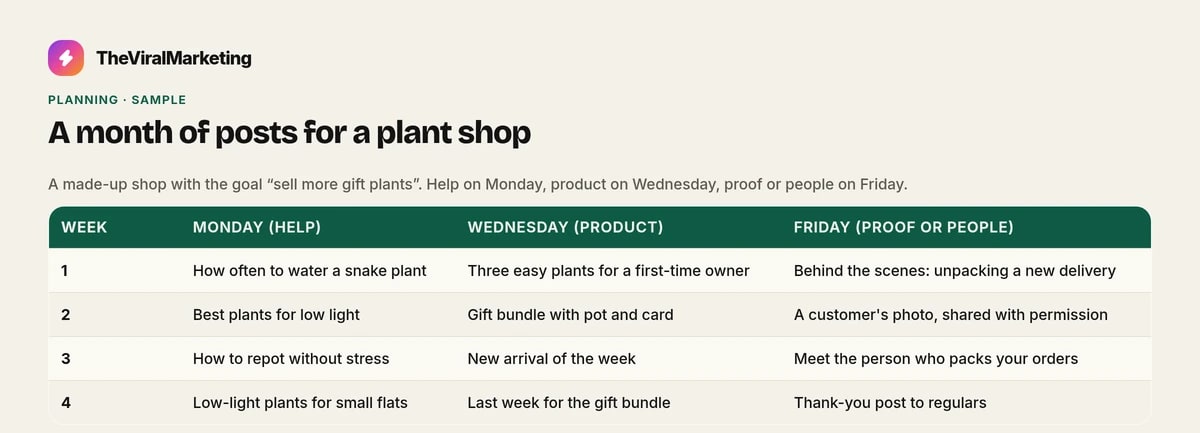
Week 1: Monday (Help): How often to water a snake plant; Wednesday (Product): Three easy plants for a first-time owner; Friday (Proof or People): Behind the scenes: unpacking a new delivery.
Week 2: Monday (Help): Best plants for low light; Wednesday (Product): Gift bundle with pot and card; Friday (Proof or People): A customer's photo, shared with permission.
Week 3: Monday (Help): How to repot without stress; Wednesday (Product): New arrival of the week; Friday (Proof or People): Meet the person who packs your orders.
Week 4: Monday (Help): Low-light plants for small flats; Wednesday (Product): Last week for the gift bundle; Friday (Proof or People): Thank-you post to regulars.
Notice the rhythm: help, product, people, every week. The goal shows up in the product posts and in the final week's offer. Nothing here needs a big budget, only a plan.
Common planning mistakes
Too many posts. A plan you can't keep is worse than a smaller one you can.
Only selling. If every post is an offer, people stop reading. Mix in help and people.
No dates. Forgetting a holiday or launch means scrambling. Mark dates first.
Never looking back. The best plan for next month comes from this month's results.
Let Autopilot fill the month
Add your brand and one goal. Autopilot can then fill a month of posts in your look and voice, on Instagram, Facebook and LinkedIn. You still read the calendar before the month starts, and you can move things around. A person approves each post, unless you turn auto-approve on.
Start a 14-day free trial, with no card, at app.theviralmarketing.co.
Questions, answered straight.
How many posts a month should a small business plan?
Pick a number you can keep up every week. For many small businesses, two to four posts a week is a realistic start.
Can AI plan a month of posts for me?
Yes. TheViralMarketing's Autopilot can plan 30 days at a time from your brand profile and knowledge, and you approve the posts.
Try it on your own feed.
Fourteen days free, no card. Connect one account and approve your first post.
14 days free · no credit card