
Workflow
A simple social media approval workflow
Approvals stop mistakes, but slow approvals stop posting. Here is a simple workflow that keeps both in check, for a small team or an agency.
Short answer: decide who approves which posts, review in one batch each week, use email approvals for people who don't log in, and only automate approvals for everyday posts above a high confidence score.
Why approvals matter
An approval step catches wrong prices, old dates, typos and posts that just don't sound right. For agencies, it's also how the client agrees to what goes out under their name.
The risk is the opposite: posts that sit in someone's inbox for a week and never go out. A good workflow is fast as well as safe.
Step 1: decide who approves what
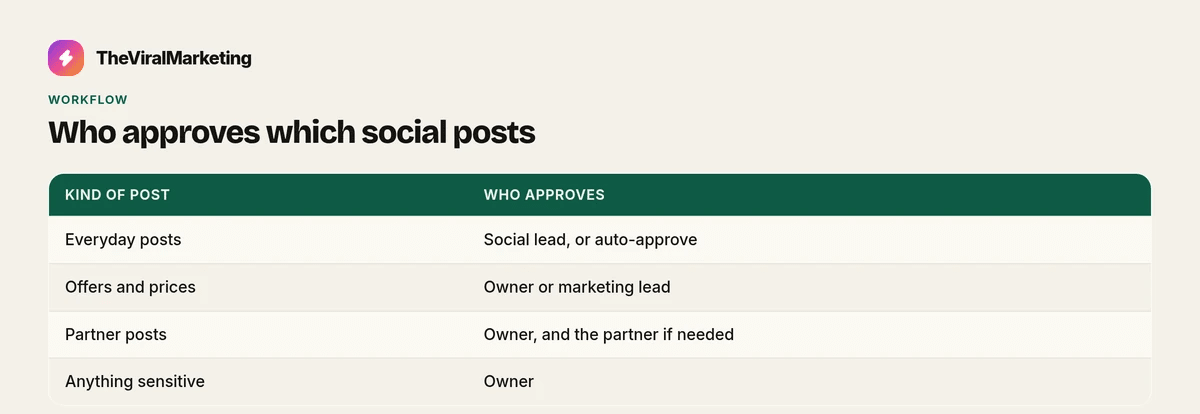
Write it down. For example:
Everyday posts: Social lead, or auto-approve
Offers and prices: Owner or marketing lead
Partner posts: Owner, and the partner if needed
Anything sensitive: Owner
Step 2: review in one batch
Pick a time each week, like Monday morning, and review the whole week in one sitting. It's faster than approving one post at a time, and you can see how the week fits together.
Step 3: make it easy for busy people
The owner or the client doesn't want another login. Send approvals by email instead.
Step 4: automate the safe part
Once you trust the drafts, let strong everyday posts go out on their own, and keep everything else for review.
Step 5: learn from rejections
When a post is rejected, note why. Wrong fact? Wrong tone? Fix the source, like your product information or brand voice, so the next draft doesn't make the same mistake.
How to choose an auto-approve threshold
Start high. A threshold of 90 means only drafts the system is most confident about go out alone. Watch what gets through for a couple of weeks. If those posts never need edits, you can lower it a little. If you find yourself wishing you'd checked one, raise it or go back to manual review for that kind of post.
Keep some posts manual no matter what the score is: offers with prices, partner posts and anything time-sensitive.
Signs your workflow needs fixing
Posts wait more than a day or two for approval.
The same kind of mistake keeps coming back.
Nobody is sure who approves what.
Approvers are reading posts one by one on their phone, at random times.
The fixes are usually simple: a clear owner for each kind of post, a weekly review slot, email approvals for busy people, and better source information.
Approvals, without another login
In Approvals, every post waits for a person unless you turn auto-approve on for everyday drafts you already trust. For a busy owner or a client, you can send a one-click approve or reject link by email, so they do not need to log in.
Start a 14-day free trial, with no card, at app.theviralmarketing.co.
A sample week
Monday: the social lead reviews the week's drafts and approves the everyday ones.
Monday: offer posts go to the owner by email. One click each.
During the week: strong drafts above the threshold go out automatically.
Friday: check what was rejected and why, and update knowledge.
Questions, answered straight.
What is a social media approval workflow?
The steps a post goes through before publishing, such as drafting, review and approval, and who is responsible for each.
Can clients approve posts without logging in?
In TheViralMarketing, yes. You can send one-click approve or reject links by email.
Try it on your own feed.
Fourteen days free, no card. Connect one account and approve your first post.
14 days free · no credit card