
Guides
Can AI run your social media? An honest answer
Mostly yes for the repetitive work, and no for the judgment. Here is where the line sits today, and how to try it safely.
Short answer: AI can now plan topics, write captions, make images and schedule posts well enough to keep a small business posting every week. It can't decide your strategy, know things you haven't told it, or be trusted to post with no checks. Use it for the work, and keep a person on the decisions.
What AI does well now
Showing up regularly. The hardest part of social media for most small businesses is consistency. AI doesn't get busy, forget or lose motivation. If it's set up to plan the next two weeks, it plans the next two weeks.
First drafts. AI is good at turning facts into a readable caption. Give it a product, a price and an audience, and you'll get something usable in seconds.
Writing for each network. The same idea needs a different shape on LinkedIn than on Instagram. AI handles that rewriting well.
On-brand images. With your color, logo and a layout, AI can make clean, consistent post images. It's not a photographer, but it doesn't need to be for most everyday posts.
Variety. Asked properly, it can show the same product from different angles, so your feed doesn't repeat itself.
Where AI still needs you
Facts it doesn't have. AI only knows what you tell it. If you change a price and don't update it, the post will be wrong. That's the most common problem, and it's easy to avoid.
Judgment. Is this the week to post a joke? Should you say something about the news? Is this offer worth pushing? Those are human calls.
Strategy. AI can execute a plan. It shouldn't be the one choosing whether you focus on LinkedIn or Instagram, or which customers matter most.
Conversations. Most AI social media tools, including ours, focus on posts, not on replying to comments and messages. Someone still needs to answer people.
Real moments. A photo of your team, your shop or a happy customer (with their permission) is worth more than any generated image. Keep posting those.
What good input looks like
Most of the difference between a bland AI post and a good one comes from what you give it. Compare two setups for the same made-up shop:
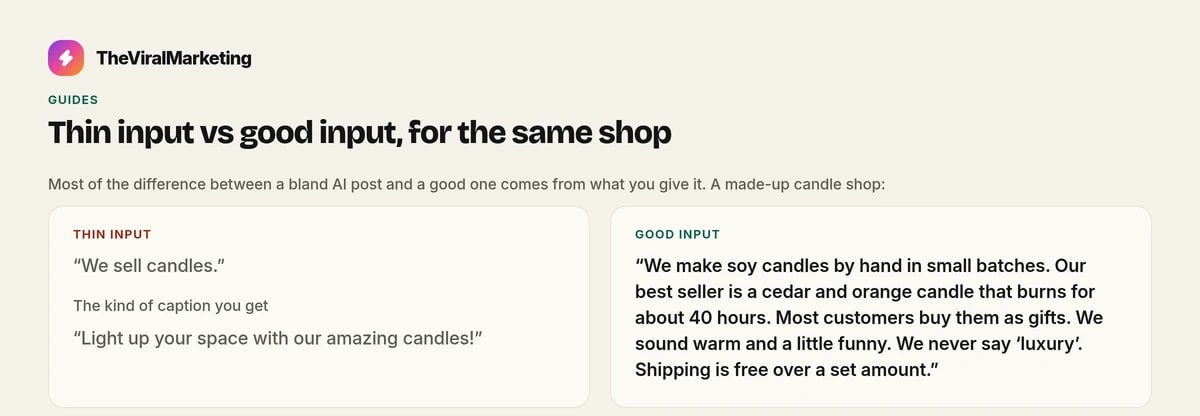
Thin input: "We sell candles."
Good input: "We make soy candles by hand in small batches. Our best seller is a cedar and orange candle that burns for about 40 hours. Most customers buy them as gifts. We sound warm and a little funny. We never say 'luxury'. Shipping is free over a set amount."
From the first, you'll get "Light up your space with our amazing candles!" From the second, you'll get something a real customer might stop for. The facts you give are what make a post specific.
A useful rule: if a stranger couldn't write a good post from your notes, the AI can't either.
The safe way to let AI post
The worry most people have is "what if it posts something wrong?" The answer is approvals.
Start with manual review. Every post waits for you. Read the first week or two carefully.
Fix the input, not just the post. If a draft is off, ask why. Missing product detail? Unclear tone? Update your knowledge so the next draft is better.
Automate slowly. In TheViralMarketing, each draft gets a confidence score. Once you trust the drafts, set an auto-approve threshold, such as 90, so only strong drafts go out alone. Everything else still waits.
Keep sensitive posts manual. Prices, sales, partner posts and anything time-critical deserve a look.
A two-week test
If you're not sure, try this:
Spend 20 minutes adding your products, audience and brand voice.
Connect one account you're comfortable testing on.
Turn on Autopilot for 14 days with manual review.
Every day or two, read the drafts. Approve, edit or reject.
At the end, ask: how long did this take me? Would I have posted this much on my own? Do the posts sound like us?
If the answers are "not long", "no" and "mostly", AI is doing its job.
Signs it's working, and signs it isn't
Good signs:
You're posting more often than you did on your own.
You edit fewer drafts each week.
Drafts mention real products, real offers and real details.
People who know you say the posts sound like you.
Warning signs:
Every post sounds the same. Add variety to your themes and more detail to your knowledge.
Facts are out of date. Update products and prices whenever they change.
You approve without reading. Slow down, or raise your auto-approve threshold.
Try it with the guardrails on
Autopilot can plan, write and schedule the everyday posts on Instagram, Facebook and LinkedIn. A person still approves each one, unless you turn auto-approve on. That is the safe way to find out whether AI can take the repetitive work, without handing over the judgment.
Start a 14-day free trial, with no card, at app.theviralmarketing.co.
Questions, answered straight.
Will AI posts hurt my brand?
Not if you review them. Keep manual review on at first, and add good knowledge about your business so drafts are accurate.
Do I still need a social media person?
For strategy, conversations and real photos, a person helps. For the weekly work of making and scheduling posts, AI can do most of it.
Try it on your own feed.
Fourteen days free, no card. Connect one account and approve your first post.
14 days free · no credit card