
Guides
AI social media automation: what to automate and what to keep human
Automation saves the most time when you pick the right tasks. Here is a simple way to decide, task by task.

Short answer: automate the repetitive, rule-based work: planning a calendar, writing first drafts, making on-brand images, scheduling and publishing. Keep the judgment human: strategy, approvals for sensitive posts, replies to people and anything about the news.
What "social media automation" means
Social media automation is using software to do repeated social media tasks for you. A few years ago that mostly meant scheduling: you made a post, and a tool published it later. Today, an AI social media automation platform can also plan the posts, write them and make the images.
A simple test for each task
For any task, ask two questions:
Is it repetitive? Does it happen every week in roughly the same way?
Is a mistake cheap? If it goes slightly wrong, is it easy to fix?
If both answers are yes, automate it. If either is no, keep a person involved.
Task by task
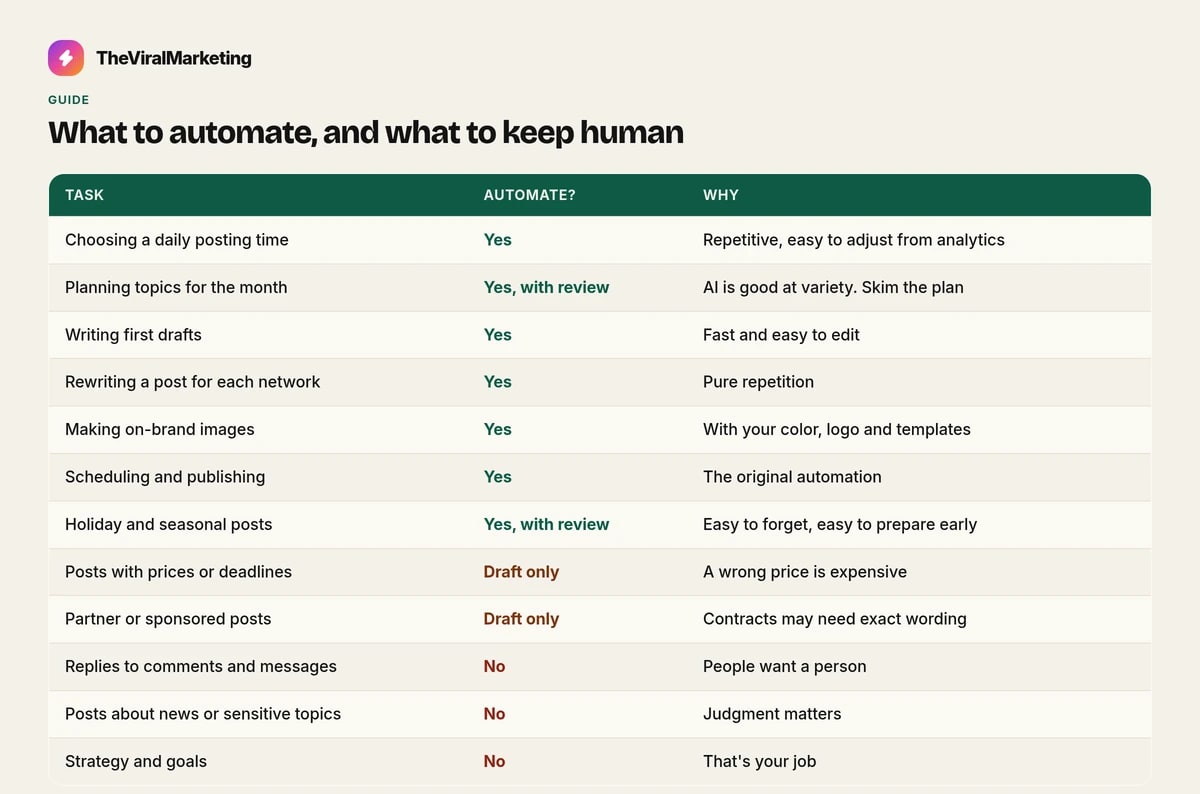
Choosing a daily posting time — Yes — Repetitive, easy to adjust from analytics
Planning topics for the month — Yes, with review — AI is good at variety. Skim the plan
Writing first drafts — Yes — Fast and easy to edit
Rewriting a post for each network — Yes — Pure repetition
Making on-brand images — Yes — With your color, logo and templates
Scheduling and publishing — Yes — The original automation
Holiday and seasonal posts — Yes, with review — Easy to forget, easy to prepare early
Posts with prices or deadlines — Draft only — A wrong price is expensive
Partner or sponsored posts — Draft only — Contracts may need exact wording
Replies to comments and messages — No — People want a person
Posts about news or sensitive topics — No — Judgment matters
Strategy and goals — No — That's your job
An example: a small café
Here's how the test plays out for a made-up café that posts three times a week on Instagram and a Facebook Page.
Automated: the monthly plan of topics, first drafts of captions, a version for each network, the post images with the café's color and logo, the posting time, and holiday posts prepared a day early.
Reviewed: any post with a price or opening-hours change, and the weekly plan, skimmed in five minutes on Monday.
Human only: replies to comments and reviews, photos of new dishes taken on a phone, and the decision to run a lunch offer next month.
The owner's time goes from a few hours a week to a short review, and the parts customers notice most, real food photos and real replies, stay personal.
Let Autopilot do the repetitive work
Use the test above to decide what can be automated. Autopilot can plan, draft and schedule those everyday posts on Instagram, Facebook and LinkedIn. Keep a person on the judgment: strategy, replies, and any post with a price, a deadline or a sensitive topic. A person approves each post, unless you turn auto-approve on.
Start a 14-day free trial, with no card, at app.theviralmarketing.co.
Automation with guardrails
Good automation knows when to stop. Autopilot in TheViralMarketing pauses and tells you when it's waiting: for a plan to be approved, for posts to be approved, because you've hit your plan limit, or because it's switched off. Nothing happens silently.
How to know your automation is working
After a month, check:
Consistency: did posts go out on the days you planned?
Edits: are you changing fewer drafts than in week one?
Results: in analytics, are reach and engagement steady or growing?
Time: how many minutes a week are you spending now?
If posts went out but results dropped, look at the mix. More real photos, more helpful tips, or a different posting time often helps.
Common mistakes
Automating with thin input. Ten minutes of setup gives ten-minute posts. Add detail.
Turning on auto-approve on day one. Read a couple of weeks of drafts first.
Never adding real photos. Automation is better with your own pictures mixed in.
Set and forget. Check analytics once a month and adjust.
Questions, answered straight.
What is an AI social media automation platform?
Software that automates the planning, writing, design, scheduling and publishing of social media posts, with a person approving what goes live.
Is it safe to automate social media posting?
Yes, with approvals. Automate the drafts and scheduling, and keep a human check on anything with prices, deadlines or sensitive topics.
Try it on your own feed.
Fourteen days free, no card. Connect one account and approve your first post.
14 days free · no credit card